


Save in Dollars
Mukuru gives you secure and instant access to USD Coin through the VALR Wallet — a trusted way to buy, hold, and sell digital dollars directly on WhatsApp.

Why Buy USD Coin?

Store your money in digital dollars

Your investment is safe & secure

24/7 access to buy and sell USD Coin instantly

No sign-up or monthly fees

Stable value designed to protect against fluctuations*

Deposit & Withdraw at thousands of Mukuru parter stores
* Trading or investing in crypto assets involves risk and may result in capital loss due to market fluctuations or regulatory changes

Start Investing Now
How to Invest in USDC

How to Get Started
Deposit and Withdrawal Points
Easily Deposit and Withdraw money at trusted retail partners nationwide. See the limits for each partner below.
Deposit








Withdraw
(Limit: R3,000 per Wicode)
*Note you can create multiple Wicode’s
Frequently Asked Questions
What is the USD Coin Wallet about?
The VALR USD Coin Wallet Coin allows Mukuru customers to buy, hold and sell USD Coin with VALR (pronounced “Valour”), a regulated cryptocurrency exchange in South Africa. The USD Coin Wallet is provided by VALR to Mukuru customers through Mukuru’s WhatsApp chat. It is a specialised Wallet created for Mukuru and our customers. It is separate from the rest of VALR’s services that they provide on their app.
Customers can deposit and withdraw ZAR through Mukuru’s payment network and access and manage their Wallet through Mukuru’s WhatsApp channel.
Who is VALR?
What is cryptocurrency?
What is USD Coin?
How do I access this product?
What is a Deposit? / Why do I need to Deposit?
You will need to Deposit / Load money into your Wallet before you can buy USD Coin.
How do I Deposit? / How do I add money to my Wallet?
Where can I Deposit?
How long does it take for the deposit to be reflected on my account?
Can I cancel a deposit order? / How do I cancel a deposit order?
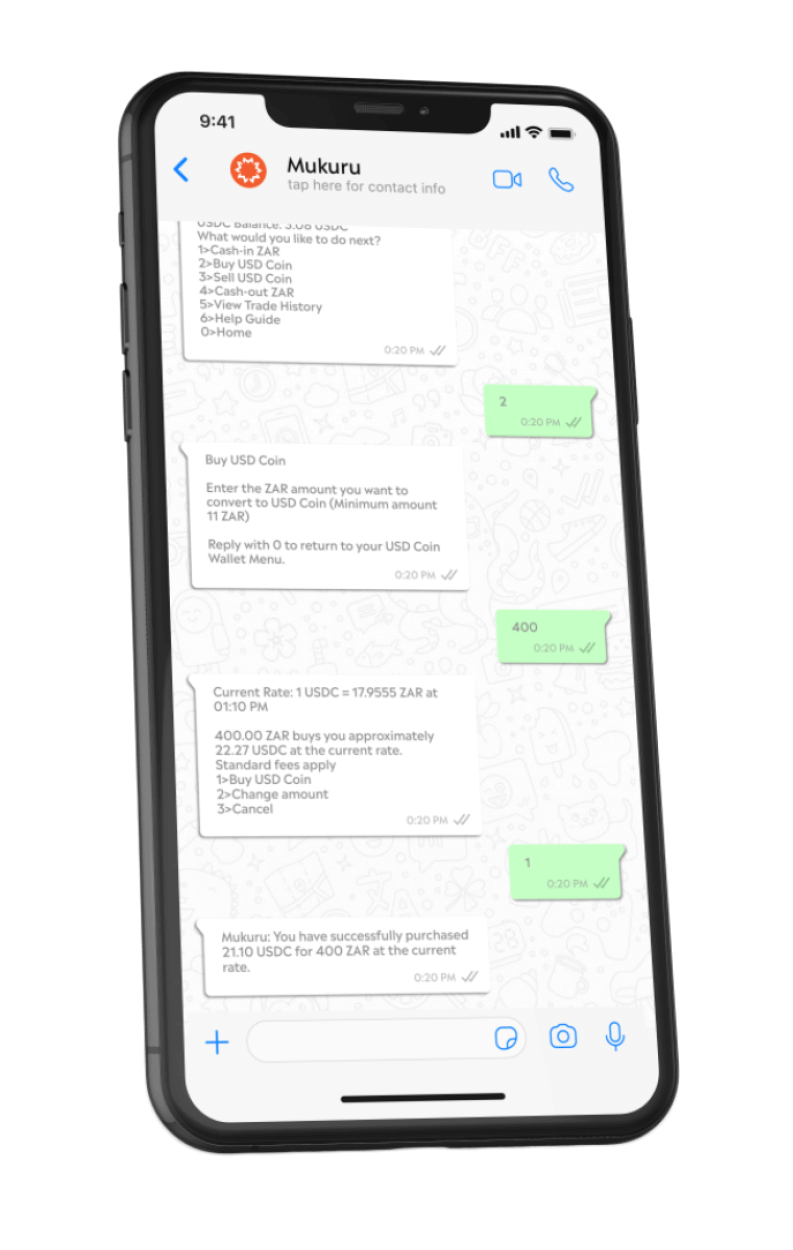
How do I buy USD Coin?
You need to deposit ZAR before you are able to buy USD Coin.
Once you have Rands (ZAR) to your USD Coin Wallet, you will then be able to instantly buy USD Coin from your USD Coin Wallet Menu.
From the Mukuru Menu:
1.Select “Invest”
2.Enter your 4-digit Mukuru Pin
3.Select ‘Buy USD Coin” On the USD Coin Wallet Menu
4.Enter the ZAR Amount you would like to buy. You will then see an estimated price per USDC
and be given a quote with the amount of USDC your entered amount will buy you.
Note this Quote is only an approximate and the screen does timeout. If you do not complete the purchase within a reasonable time, you would need to enter a new buy amount and the new quote may vary.
5.Confirm your purchase and your balances will then update with your new ZAR and USDC balances and you will receive a confrimation message soon after.
What are the fees for buying USD Coin?
When can I buy USD Coin?
How long does it take to receive my USD Coin?
Do I have to use all the ZAR (rands) in my Wallet to buy USD Coin?
What is a Withdrawal?
If you wish to take out your money from your Wallet, you can create a Withdrawal via the WhatsApp Menu. You need to create a Withdrawal and generate a Wicode Voucher to withdraw your money.
How do I Withdraw?
Where can I Withdraw?
Can I cancel a Withdrawal? / How do I cancel a Withdrawal order?
Can I create a new Withdrawal order at any time?
FEES
Sign-up Fee
Free
Monthly Fee
Free
Deposit Fee
Tiered
Withdrawal Fee
Tiered
Buy/Sell Fee
1.2%
CARB (Pty) Ltd, with registration number 2013/057752/07, is a registered and certified third-party payments provider. The Invest Service is offered by VALR (Pty) Ltd, which is a licensed financial services provider (FSP #53308). Please be aware that trading or investing in crypto assets involves risk and may result in capital loss due to market fluctuations or regulatory changes.
